BlushWeb

A name with possibilities.

Start with a role map, then verify the colors

The color-role worksheet is an original planning method for this concept. It defines which elements may share a color role before specific shades are selected. It does not certify accessibility. Final combinations still need contrast measurement and interaction review in the actual interface, including keyboard and narrow-screen use.

Make a five-role inventory

List canvas, text, action, emphasis and boundary. Canvas is the main reading surface; text carries ordinary information; action marks interactive controls; emphasis highlights occasional editorial material; boundary distinguishes adjacent regions. For each role, write the elements that use it and the states they need. A button, for example, may need default, focus, disabled and pending states. Avoid assigning a single new color for every state before deciding how labels, borders or other cues can make the distinction understandable. This keeps the palette manageable without hiding behavior.
Map a fictional event page

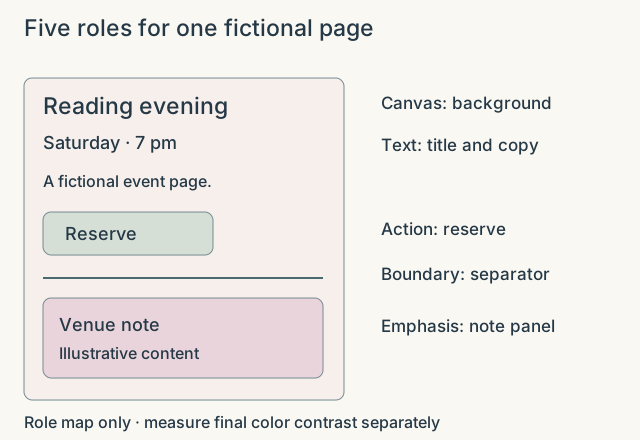
Imagine a fictional reading event page with a title, date, paragraph, reserve button and venue note. Assign the page background to canvas and the title, date and paragraph to text. The reserve button uses action. The venue note receives a small emphasis panel with ordinary readable text inside it. A thin boundary separates the schedule from the venue note. There are five roles but not necessarily five unique colors. The example specifies relationships only; it makes no claim that any unmeasured shade pair will have sufficient contrast.

Review changes by role rather than accident

Suppose the fictional design later uses a stronger accent. Update the action role deliberately and inspect all elements that inherit it, including focus and pending states. Do not recolor an unrelated warning simply because it once used a similar shade. Keep a short record of the role, affected elements, measured combinations and unresolved states. The result is a palette that can evolve coherently. A final visual review should compare ordinary reading, interaction feedback and compact layouts, because a beautiful opening screen alone does not establish a usable website.

Five roles for one fictional page
Illustrative reference for BlushWeb. The example is fictional. Scroll the diagram horizontally on smaller screens.